
Internal Audit Software Migration Checklist
An internal audit software migration checklist should help you answer one question before signing a contract: can your team still explain every open finding after the switch? If you are moving from Excel, shared folders or a legacy audit system, test one complete record before you agree to move the rest.
1. Decide what to move, archive or rebuild
Start with open findings, in-progress engagements and the evidence reviewers still need. List the source of truth for each record. Keep closed files in a searchable, access-controlled archive when your team can meet its retention and retrieval needs that way. Rebuild process or control libraries selectively, with an owner and approval for each change.
For each dataset, write down the source, owner, record count, date range, destination and who will sign off. Flag duplicate IDs and missing owners before you start. Preserve a read-only source extract and agree what happens to changes after the extract is taken.
2. Test the checklist with each vendor
Use one fictional or anonymized finding and an engagement that reflects how your team works. Ask the vendor to show each field or relationship in the target system. Record which steps use an import template, which need manual work, and who will own each step.
| Bring this from the source | Verify this after migration |
|---|---|
| Finding F-047, original rating and source reference | The record can be traced to the source and the rating maps to the correct value. |
| Open action, named owner and original due date | The action stays open, with the assigned owner and due date visible in follow-up. |
| One evidence file and one review decision | The authorized reviewer can retrieve both and see whether they were migrated or retained in an archive. |
| One restricted working paper | A permitted reviewer can open it and a user without that role cannot. |
| One extract of open actions by entity | The target report reconciles to the source counts or an approved exception list. |
3. Put responsibilities and costs in the quote
Ask for a written split of vendor and customer work. Cover extraction, data cleanup, field mapping, attachment handling, permission testing, training and go-live support. Name who decides whether a record can remain in the archive and who fixes an exception. Use the same acceptance checks in every proposal so your audit, IT and procurement teams can compare like for like.
Include those checks in the internal audit software RFP template. For a Saudi rollout, also review what goes into the Abilite quote and confirm cloud or on-premise responsibilities with IT.
4. Agree the go-live decision before cutover
Sign off record counts, mandatory fields, permissions, and any reporting differences. Set a cutover time and agree how to handle late changes. Keep the legacy records accessible until the business owner can retrieve the evidence and reports needed for the next review.
Internal audit software migration checklist for failed pilot tests
Use the same internal audit software migration checklist whether you’re replacing Excel or moving from a legacy platform. Record each exception against the original finding or engagement ID. Note whether the failure affects access, evidence, ownership, due dates or reporting. Ask the vendor to identify the cause, show the fix and rerun the original test with your reviewer. Keep the result with the checklist so reviewers can see what was corrected before sign-off.
Before you close your internal audit software migration checklist, verify your archive. If some historical files will remain outside the new system, agree who can retrieve them and how long the source will stay available. Run one retrieval test before you switch. Give the reviewer only the original engagement or finding reference and confirm they can locate the working paper, evidence and approval record. Treat a failed retrieval or unexpected access as a cutover issue until the audit lead decides how it will be handled.
For audit teams applying The IIA’s Global Internal Audit Standards, Standard 14.6 gives reviewers a useful test: could another qualified auditor repeat the work and reach the same result using the migrated records?
What can you test with Abilite?
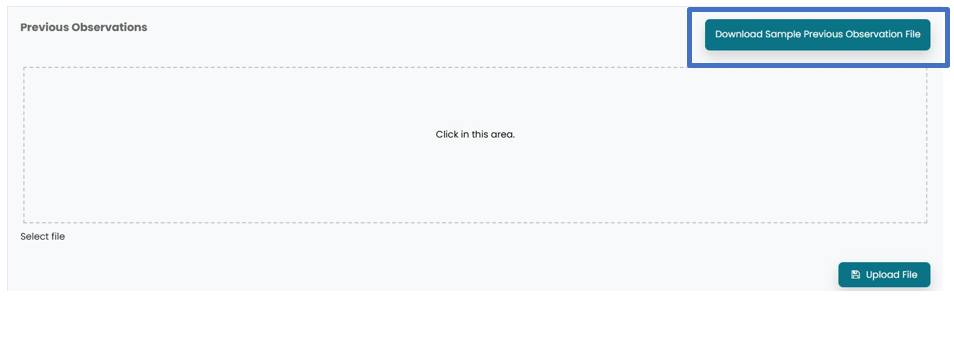
Abilite documents an Excel template for uploading previous observations. Ask the team to show which fields the documented process handles. For attachments, approval history and other records, confirm in writing what can be imported, what requires separate work, and what can stay in your archive.
Book a 30-minute Abilite demo and bring one anonymized finding, its review history and your current data layout. Use the pilot checks above to see what the switch would involve.
Still shortlisting tools? Start with our internal audit software comparison.
